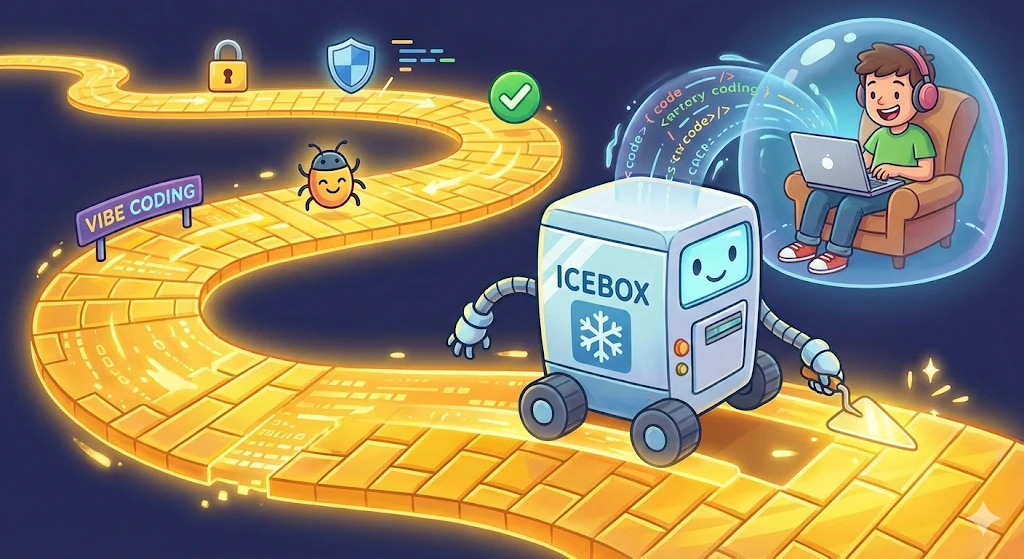
Icebox: a safer way to YOLO@Home
TL;DR
AI Coding at home is really dangerous - I made Icebox to help keep personal data safe.

Danger Zone
By now, we should all be keenly aware of the many risks that have arisen from prompt poisoning attacks. If not then consider this a PSA:
Anyone using GenAI for coding or other complex workloads without guardrails or additional controls is taking a huge risk.
Defenses are on the way
Many companies have already responded to this new threat and are now on the AI Security bandwagon. The forward thinking ones have been rolling out controls to mitigate this new type of cyberattack and enable adoption of AI Agents (AI driven tools that autonomously perform multi-step tasks) in the enterprise.
If you are lucky enough to work at one of them, you are likely protected by an elaborate set of interlocking security controls, such as:
- Sandboxing - running your agent in a container provides isolation from the host device.
- Guardrails - Prompts that instruct the LLM to "do no evil" (sometimes works).
- LLM proxies - Centralized control, enabling monitoring and alerting.
- Network Segmentation - Sensitive stuff is out of reach.
- Firewalls - Limits an agent's access from / to the outside world.
- Endpoint Detection and Response (EDR) - i.e. Crowdstrike on your company issued laptop for rapid response when an agent drops malware.
These controls are good at mitigating most forms of prompt poisoning attacks. That is great for enterprise scale projects, however, many AI practitioners are spending many hours (and tokens) honing their Agentic coding skills at home, without any of the protections we've become so reliant on at work.
In fact, I suspect that most folks (myself included) are more likely to experiment with AI technology on their personal device, than with their more highly protected / restricted work computer. The lack of controls on personal devices opens the door wide open to malicious prompt poisoning attacks.
🫣This makes me really nervous.😱
The Trifecta of Doom
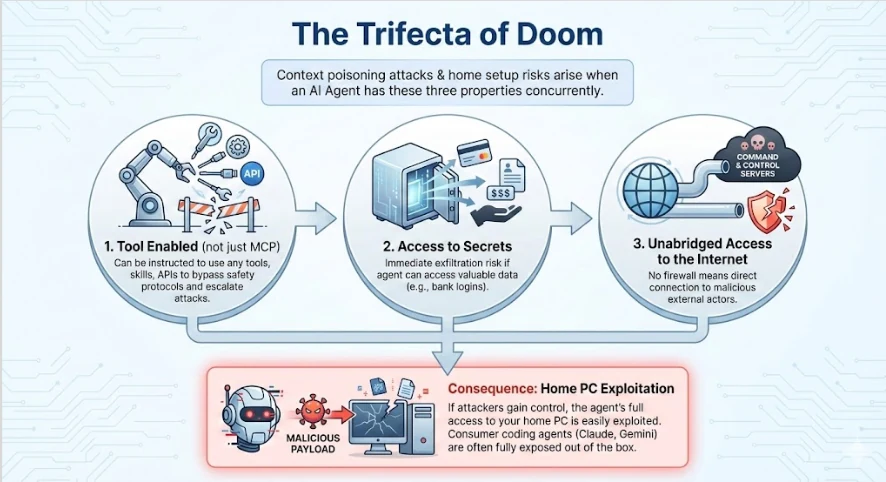
First a bit of background on the nature of context poisoning attacks and how your home setup might be exposed. This risk emerges anytime you use an agent with the following properties:
- Tool enabled (not just MCP) - the Agent can be instructed to use any tools, skills, apis, etc.., to work around guardrails and escalate attacks.
- Access to secrets (personal bank login?). If there is anything of value that the agent has access to, it will be exfiltrated almost immediately.
- Unabridged access to the internet. - no firewall to cut off known command and control servers
The key to protection is to avoid at least one of the conditions and while some of these factors may be mitigated in enterprise environments, the consumer variants of Coding agents like Claude and Gemini are fully exposed to all three conditions right out of the box. If attackers gain control of your Agent by feeding it a malicious payload, everything you have access to from your home PC can be easily exploited.
Claude at Home? YOLO!
So should we give up on experimenting with AI at home? On the one hand, attackers have been busy poisoning data sets, projects, website comments, etc… for a while now. And the risk is increasing each day. But can you afford to fall behind the latest advancements? How can we build up our agentic coding skill set if we can't practice and experiment with the latest available tools?
The problem is that eventually, your Agent will process a poisoned context, resulting in the complete circumvention of all of your controls (if you have any).
This is, virtually, handing the keys to your front door to an attacker with an agenda. Most likely they will drop an info-stealer to harvest your passwords and drain your accounts, or trigger a ransom attack which could be devastating to your home network and personal digital library (Are those family photos backed up?).
If you are practicing "raw" vibe coding at home you should be sweating by now.
Enterprise solutions for AI Security are impractical, ineffective or just too expensive to run at home. But I want to YOLO my heart out so I needed a rock-solid solution that I could trust. I ended up creating my own version of a sandbox solution to ensure that I can use the latest AI tools at home with minimal risk.
Icebox
Icebox is a Linux development environment that anyone can easily deploy at home to keep AI Agents separate from their private files and home network. It's designed for peace of mind, automatically implementing the security controls you need to safely experiment with the latest AI tools at home
Icebox works like a typical devcontainer but with settings that block the Trifecta of Doom by default, rather than enable it.
Like other sandboxes, Icebox uses read only file system overlays and in memory shims to prevent agents from destructively modifying the host system, but it couples those controls with a rootless podman container to limit break out blast radius, and strict network filtering so the Agent in the box can't access any exposed services on the host network.
Icebox environments are meant to be ephemeral, so any changes within the container are discarded and paved over when the container is restarted. This is an important property, ensuring that whatever the agent does in the container stays in the container (like Vegas) and it prevents attackers from setting up persistent entry points if the agent is exploited.
Built in Protection
An Icebox session starts by copying the Icebox Make file (Icebox.mk into the root directory of a new or existing git repo (instructions here), and running make -f Icebox.mk up. This will configure and run a local container as the current user and maps the local git checkout and system folders to the overlay filesystems.
Next, the user is logged in to the container using their existing local credentials but without needing to provision secrets within the Icebox. This permits the agent within the container to leverage the user's authorization using ssh-agent and certificate forwarding. Since only the certificate is present in the container, Icebox ensures that an attacker can not steal your identity if the agent is compromised since it has no visibility of the user's private ssh keys.
The connectivity is one way only and restricted to the current user and host system. A VSCode (or claude, gemini, etc..) session is launched inside the container and displayed on the host device via waypipe/rdp so even if the agent exploited the IDE, it would still occur entirely inside the Icebox (vscode via ssh does not provide comprehensive protection).
A Golden Path
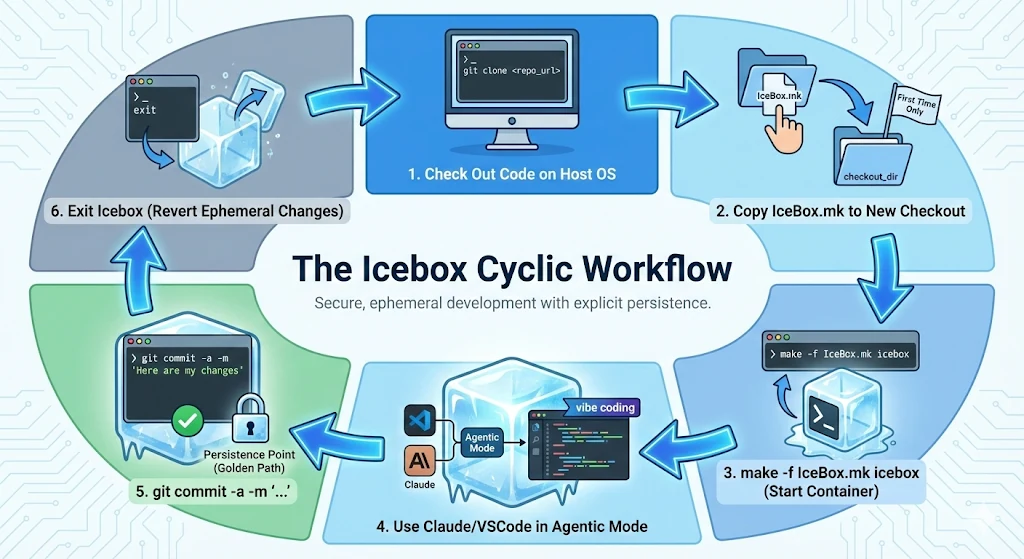
The container is configured such that git commit applies the local changes in the container to the git repo checkout on the host system. From there you can edit, test and review the generated code before pushing to the upstream repository.
The workflow goes something like this:
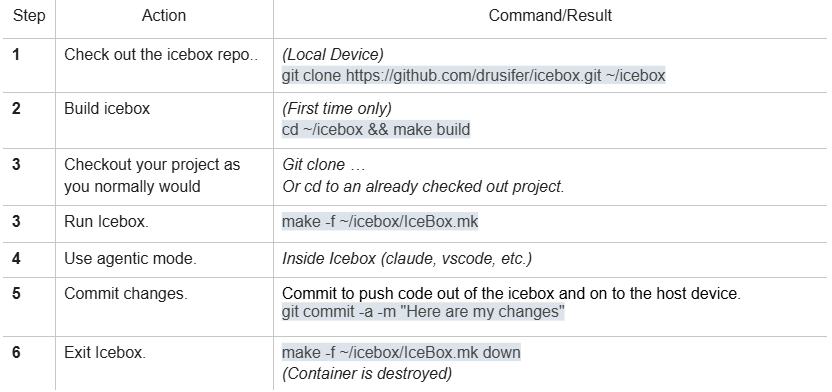
This enforces the human-in-the-loop principle and makes the persistence of any changes an explicit event that can be reviewed. Any other modifications in the Icebox will be reverted when the Icebox exits which makes it nearly impossible for attackers to persist by "living off the land".
Exploits that require write access to system binaries are entirely blocked by the shims and lateral movement is also blocked by restricting access to the local network. Only allow-listed internet is visible, and there are no inbound routes which helps block the attacker's command and control, and exfiltration avenues.
In the worst case scenario, a sophisticated attacker could potentially access the code or libraries checked out in the Icebox but even a ransom of the entire container would be undone once the Icebox exits.
Ready to code safely at home? Check out the Icebox repository for full instructions and to get started today: Icebox on GitHub. Feel free to provide feedback / feature requests for further development.
I built Icebox to mostly stay out of your way during a coding session. Just remember to commit early and often so you can just sit back, relax, and…